Voice Caller ID + SMS Pro
a) voice quality guaranteed to be good for all types of phonesb) it can also speak out the name of the person you are callingc) allows you to customize a voice message for each contact which will be spoken out when that contact calls.
If you don't specify a customized message then the name of the contact will be spoken out.d) Bluetooth support
there is a free lite version that you can try out first.
*** If voice announcement does not work please check that there is free space on your sd card and add contacts again ****
*****if after some time of use you find out that some caller names are wrongly announced please use the "add all contacts" button to recreate all your voice contacts and synchronize again the application's list with that of your phone's
other features:
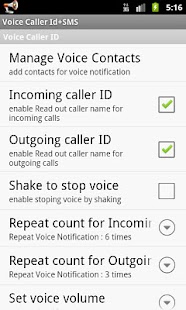
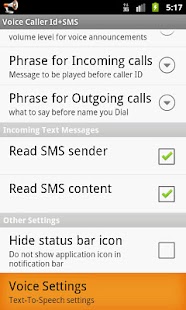
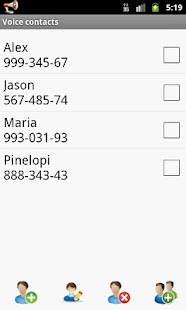
**** add your voice contacts first.***** Only the contacts in the application's voice contacts list will be spoken out* pro version allows you to add all your contacts with a single click* if you wish, you may change the default voice announcement and add a customized voice message for one or more contacts using the "edit" button.* add a default message to be spoken out before the contact's name for incoming or outgoing calls* enable or disable speaking of the contact's name when you are making calls* speaks out the name of the contact that has sent you an sms* speaks out the contents of the sms (pro ver only)* choose the volume for voice announcement.
choose a level higher than your ringtone's volume* choose whether to stop voice for incoming calls and sms by shaking * BlueTooth support.
Please note that on some phones with 4.0 and later BT may not work* if you change anything in voice settings (language, pitch, speed) you have to add voice contacts and pre-caller id phrases again* select menu for more instructions
About Voice Caller ID + SMS Pro
- Package name (App ID)
- com.ycdroid.voicecallid
- Available on
- Google Play
- Price
- Free
- Version
- v2.2
- Developer
- Ed Kawas
Looking for the Voice Caller ID + SMS Pro APK?
The safest way to get Voice Caller ID + SMS Pro (com.ycdroid.voicecallid) on your Android device is to install it directly from Google Play — you'll always get the latest official version, automatic updates, and no risk of modified or infected APK files from third-party sites.
Food & Dining
Discover recipes and order food from your favorite restaurants.
Automotive
Manage and monitor your vehicle with smart features.
Cross-Device Sync
Seamlessly sync your data across all your Android devices.
See Voice Caller ID + SMS Pro in Action
Frequently Asked Questions
Is Voice Caller ID + SMS Pro free?
Yes, Voice Caller ID + SMS Pro is free to download and install on Android through Google Play.
How do I install Voice Caller ID + SMS Pro on Android?
Open Google Play on your Android phone or tablet, search for Voice Caller ID + SMS Pro by Ed Kawas or tap the Google Play button on this page, then tap Install. The app downloads and installs automatically.
What is com.ycdroid.voicecallid?
com.ycdroid.voicecallid is the App ID (package name) of Voice Caller ID + SMS Pro on Google Play. Every Android app has a unique package name, and it is the safest way to verify you are installing the official app.
Is Voice Caller ID + SMS Pro safe to download?
Installing Voice Caller ID + SMS Pro from Google Play is the safest option: you get the official version published by Ed Kawas, verified by Google Play Protect, with automatic updates. Avoid APK files from unofficial third-party sites.

Get Voice Caller ID + SMS Pro Today
Voice Caller ID + SMS Pro for Android — free download on Google Play.
Compatible with Android phones and tablets — available on Google Play.
Ask AI about this app
Get instant answers about features, tips and more from popular AI assistants.